

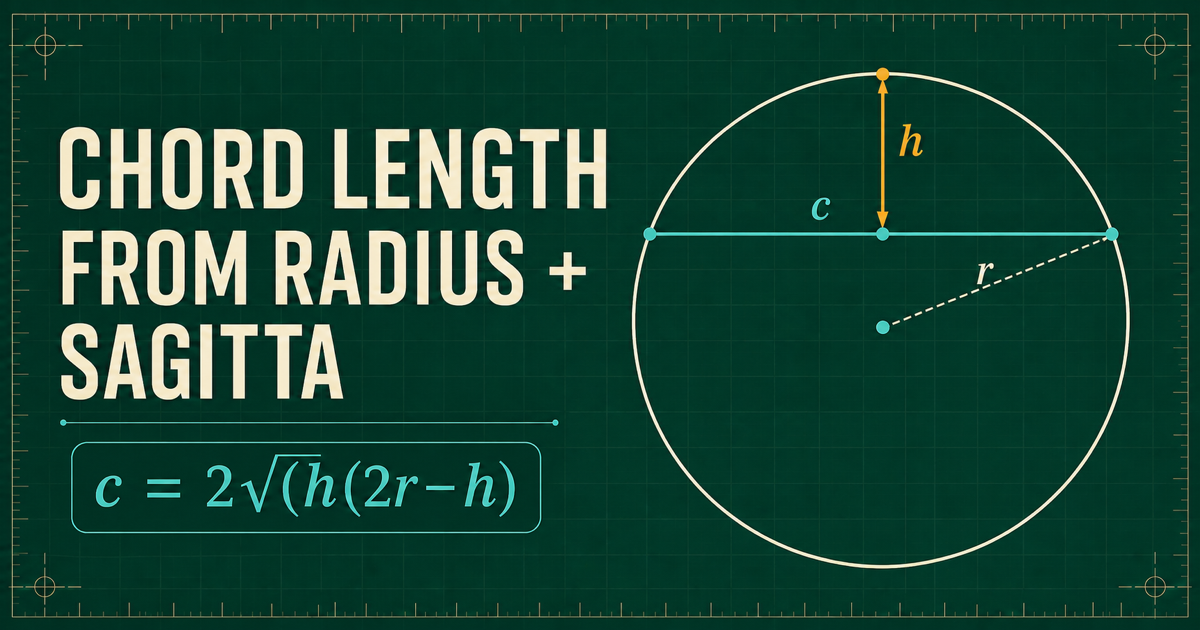
When you know a circle’s radius and the rise of an arc above its chord, you already have enough information to find the chord. This guide derives the relationship, works a complete example, and shows the checks that keep a shallow-arc measurement from becoming a misleading result.
Quick answer: chord length from radius and sagitta
For a minor circular segment, let r be the circle radius and h be the sagitta—the perpendicular height from the midpoint of the chord to the arc. The chord length c is:
Chord from radius and sagitta
c = 2√(h(2r − h))Use the same length unit for r and h. The chord result uses that unit too.This guide and the matching calculator use the minor-segment convention, where 0 < h ≤ r. At h = r, the chord passes through the circle center and becomes the diameter. A value above r describes the major side of the circle and needs an explicit major-segment convention rather than being entered as a minor sagitta.
What the chord, radius, and sagitta represent
A chord joins two points on a circle with a straight line. The radius runs from the circle center to either chord endpoint. The sagitta runs from the chord midpoint to the arc. Because the line from the center to the chord midpoint is perpendicular to the chord, the diagram splits into two equal right triangles.
The distance from the circle center to the chord is r − h. Half of the chord is the other leg of the right triangle, and the radius is its hypotenuse. That right triangle is the entire reason the formula works; no numerical approximation is needed until the final square root.
- r: circle radius, from center to the arc.
- h: sagitta or arc height, from chord midpoint to arc.
- c: full straight chord between the two arc endpoints.
- r − h: perpendicular distance from circle center to chord.
- c ÷ 2: one half of the chord, used in the right triangle.
Open the Circle Chord & Segment Calculator beside a sketch and select radius plus sagitta as the known measurements. The calculator returns the chord and the related circular-segment values without changing the geometric convention described here.
Deriving the chord formula with Pythagoras
Call half of the chord x. The right triangle has legs x and r − h, with hypotenuse r. Apply the Pythagorean theorem and solve for x before doubling it to recover the full chord.
Start with the right triangle
x² + (r − h)² = r²The radius is the hypotenuse; the center-to-chord distance and half-chord are the two legs.Isolate the half-chord
x² = r² − (r − h)² = 2rh − h²Expanding the square cancels r² and leaves h(2r − h).Double the half-chord
c = 2x = 2√(h(2r − h))The factor of two is essential: the right triangle contains only half of the chord.The formula also supplies a quick reasonableness check. Within the minor-segment range, increasing h moves the chord toward the circle center and makes c longer. The longest possible minor-segment chord occurs at h = r, giving c = 2r—the circle diameter. A result above the diameter signals an input, unit, or transcription error.
Worked example: radius 10 and sagitta 2
Suppose a circular arc has radius 10 cm and a measured sagitta of 2 cm. The center-to-chord distance is 10 − 2 = 8 cm. Substitute r = 10 and h = 2 into the chord formula.
Substitute the measurements
c = 2√(2(20 − 2)) = 2√36 = 12 cmHalf of the chord is 6 cm, so the right-triangle sides are 6, 8, and 10 cm.| Measurement | Relationship | Result |
|---|---|---|
| Chord length | 2√(h(2r − h)) | 12.0000 cm |
| Central angle | 2 arccos(1 − h/r) | 73.7398° |
| Arc length | rθ, with θ in radians | 12.8700 cm |
| Minor segment area | ½r²(θ − sin θ) | 16.3501 cm² |
Input checks before you trust the result
A correct formula cannot repair an ambiguous measurement. The most common problem is taking the height from an endpoint, a sloped reference, or an arbitrary point on the chord instead of its midpoint. Mark the two chord endpoints, locate their midpoint, and measure h perpendicular to the chord.
- Confirm that radius and sagitta refer to the same circle and use the same unit.
- Use the straight chord between the chosen arc endpoints, not the curved arc length.
- Measure sagitta at the chord midpoint and perpendicular to the chord.
- For this minor-segment method, require 0 < h ≤ r.
- Check that the calculated chord is positive and no longer than 2r.
- Keep extra digits during the calculation and round only the displayed result.
Very shallow arcs deserve extra care. When h is small compared with r, a small absolute error in the height can noticeably change the derived chord or radius. Record the measurement method and precision instead of presenting more decimal places than the inputs support.
Common chord-and-sagitta mistakes
- Using diameter in the r field. Divide the diameter by two before applying a radius-based equation.
- Forgetting that the derivation uses half the chord. Solving for x and reporting x instead of 2x halves the answer.
- Treating sagitta as arc length. One is a perpendicular height; the other follows the curve.
- Mixing millimetres and inches. Convert first so r and h share one unit.
- Entering a major-segment height into a minor-segment workflow. State which side of the chord is being described.
- Using degrees in s = rθ. Convert the central angle to radians before multiplying by the radius.
- Assuming the result supplies a tolerance. Geometry returns an ideal value; allowable variation belongs to the drawing or design requirements.
A useful final check is visual as well as numerical: a small sagitta should produce a shallow arc and a chord much shorter than the diameter, while h approaching r should produce a chord approaching the diameter. If the sketch and the numbers tell different stories, revisit the reference points before continuing.
Calculate the whole circular segment in one pass
Use the free Circle Chord & Segment Calculator when you want the chord, angle, arc length, sagitta, and minor segment area together. Choose sagitta as the known measurement, enter the radius and height, keep the units consistent, and set the displayed precision for the result you need to communicate.
The calculation is useful for preliminary checks involving arches, curved templates, circular cut lines, layouts, and other ideal circle geometry. It does not replace material behaviour, fabrication allowances, tolerances, standards, or an appropriate professional review for critical work.
Circle Calculator extends focused circle workflows to iPhone and Android with measured diagrams and local tools. Start with the browser calculator so you can verify the relationship without an account; use the store buttons only if the mobile workflow fits your job. Current app availability and purchase terms are always shown by your device’s store.
Keep the curve with you
Continue in Circle Calculator.
Work with chord, arc, and segment measurements on iPhone or Android, view measured diagrams, and evaluate eligible Pro export workflows when you need a file. Current availability and purchase terms appear in your device’s store.